Two independent 6 operator FM engines with that classic 80s digital sound.
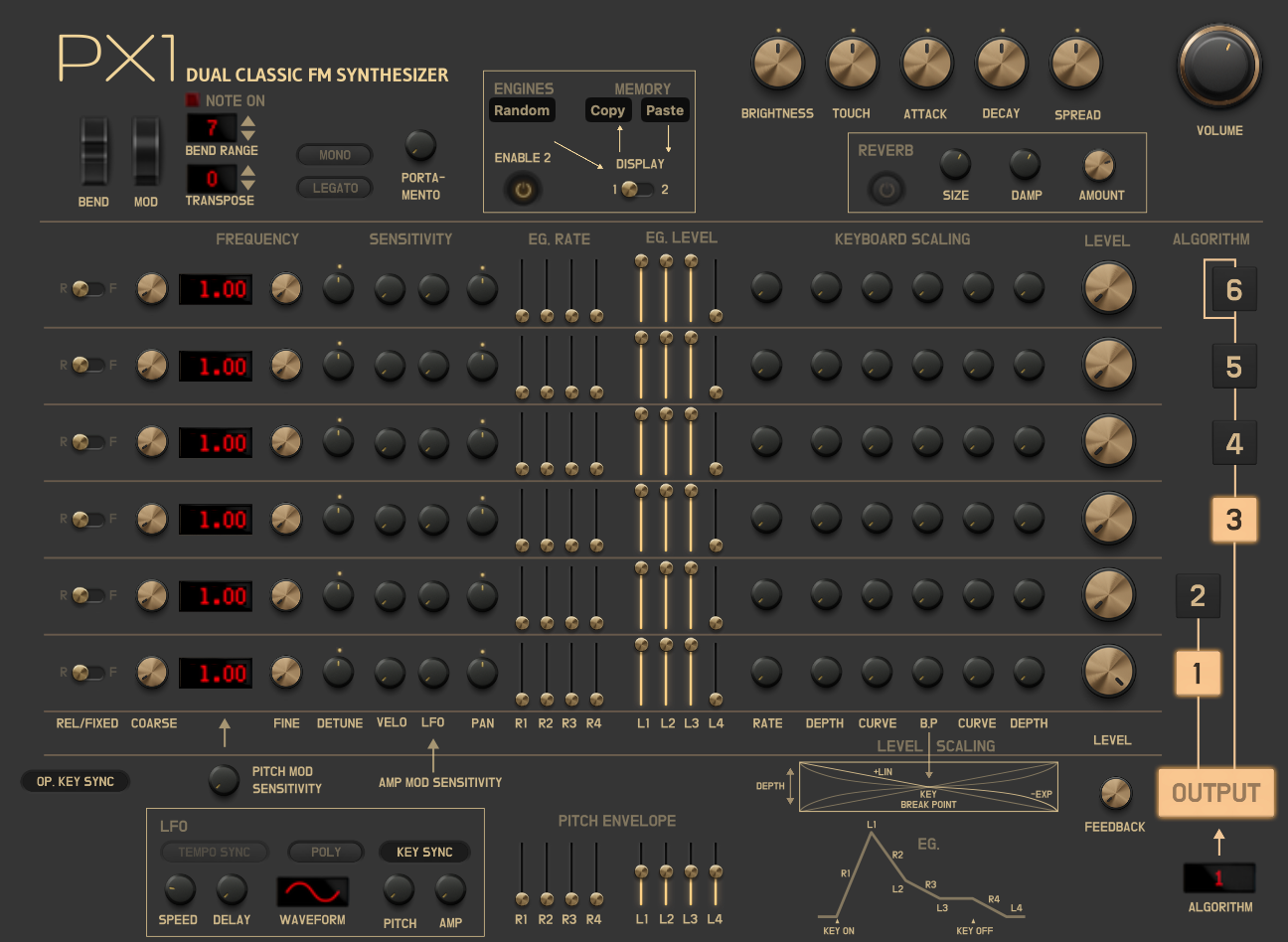
These five knobs affect both engines at the same time:
The switch selects which engine you're editing. All parameters (operators, algorithm, LFO, etc.) belong to the selected engine.
Copy stores everything from the current engine into memory.
Paste loads that memory into whichever engine the Engine Chooser is currently set to.
A typical stereo trick: set up Engine 1 → Copy → switch to Engine 2 → Paste → change just a few things (for example detune or fine pitch) → turn up Spread.
You can also layer patches: load a patch from the patch browser (goes to Engine 1) → Copy → load another patch (also to Engine 1) → switch to Engine 2 → Paste. Now Engine 1 and Engine 2 have different patches.
Fills the current engine with a random sound from the classic FM sound palette. Great for discovering new ideas or breaking out of a creative block. Press it multiple times to keep exploring until you find a sound you like.
Simple switch that turns the second voice on or off.
Built-in reverb with four controls:
Each engine has six operators. Think of them as six sound sources that can either produce tone or shape other operators.
This is FM Synthesis (Frequency Modulation). A modulator changes the frequency of the operator it's connected to using its own frequency – think of it as an extremely fast vibrato that creates new harmonics instead of a wobble. Carriers are the operators you actually hear. When the frequency ratio between a modulator and its carrier is an integer (1:1, 2:1, 3:1…) the result is harmonic and musical; non-integer ratios produce inharmonic, bell-like or metallic tones. The algorithm decides which operators are carriers and which are modulators.
Each operator has an envelope with four segments. When you press a key, the envelope moves through these stages:
The four Rates (R1–R4) control how fast each transition happens. The four Levels (L1–L4) control the volume at each stage. For example, raising L3 makes the sustain level higher; increasing R4 makes the release slower.
When enabled, all operator sine waves restart from zero every time you press a key – giving a consistent attack. When disabled, operators start at random positions in their cycle, which adds subtle variation to each note. This is especially useful with two engines: turn sync off on one engine and you get a natural stereo widening effect because the two engines never start in phase.
Chooses how the six operators are connected to each other. Different algorithms give very different tones – from bright bells to warm pads.
All the original parameter names and behaviours are kept so experienced users feel at home, while the plain-language descriptions above make it easy for anyone to understand what each knob does.